Teachers
Teachers create classes, manage rosters, publish assignments, review essays, build rubrics, release results, and control the premium seat model.
AP English writing platform
Instagrity supports teacher-created classes, student assignment workspaces, rubric-aligned scoring, released feedback, premium seat controls, and public review pages for schools that want one clear platform for AP English Language and Composition and AP English Literature and Composition workflows.
Teacher classes, rosters, join codes, and assignment publishing
Student drafting, submission, and teacher-controlled released results
Essay review with scores, annotations, and final classroom release

Review
Review score details, teacher override, and grading metadata stay in one view.
Annotation
Teachers can attach contextual notes directly to specific lines.
Release
Students only see released results when the teacher allows visibility.
Who the product serves
The product is easier to understand once the roles are stated directly. Public visitors do not need to guess whether Instagrity is for students, schools, or teachers because each role has a specific surface in the current app.
Teachers
Teachers create classes, manage rosters, publish assignments, review essays, build rubrics, release results, and control the premium seat model.
Students
Students join classes, complete assignments, access released scores and notes, and read inline annotations when teachers make them visible.
Admins
Admins oversee users, premium entitlements, AI grading controls, audit logs, feedback reports, and deleted-essay recovery.
Schools and reviewers
School reviewers can use the public pages to inspect privacy, terms, security, contact, and subscription details before onboarding conversations begin.
Product screens
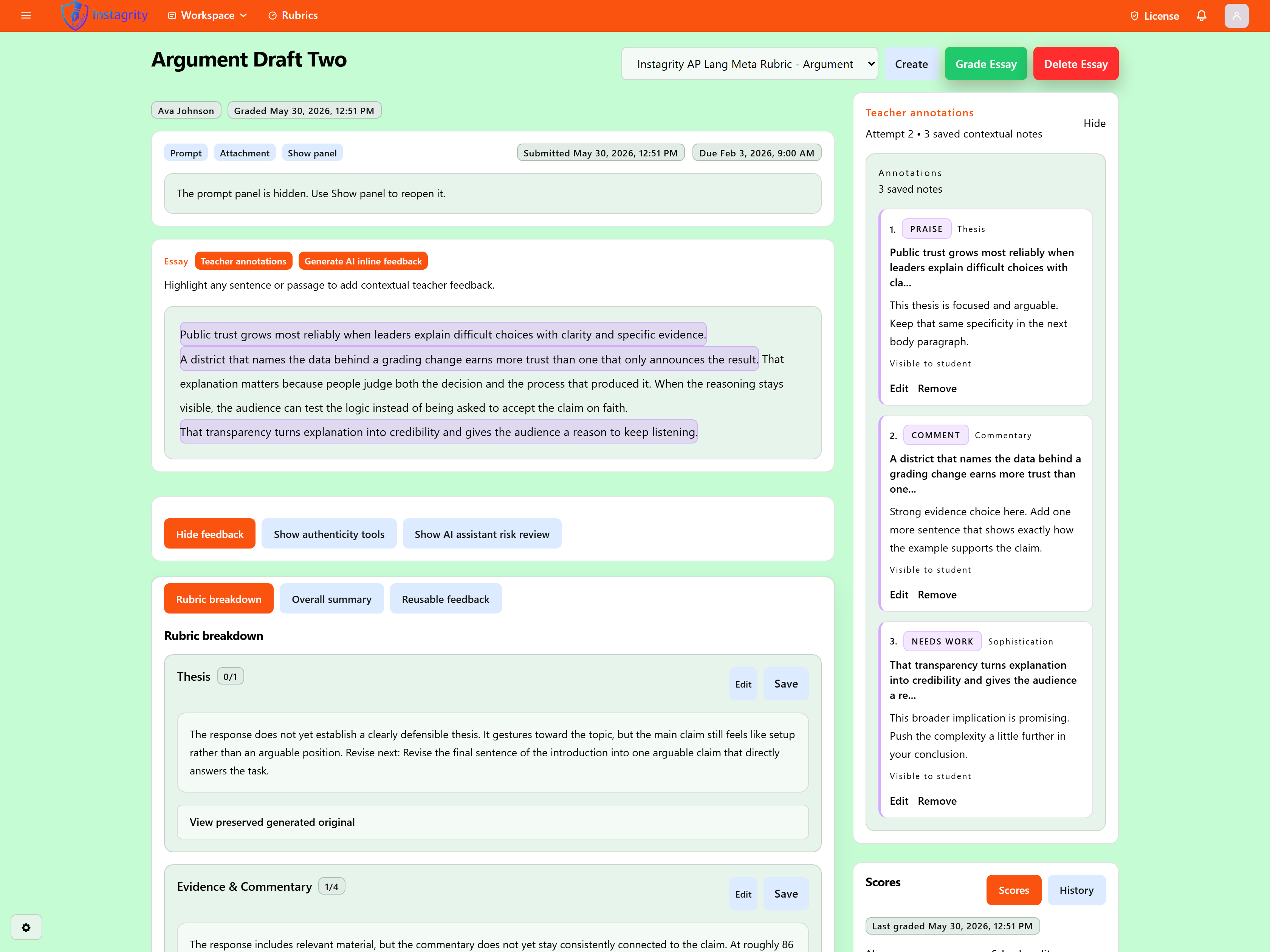
These captures come from the actual teacher workflow using placeholder names like XYZ instead of real people. They show the strongest current premium and review surfaces in the app.

Teachers start in a class-first dashboard with join codes, roster totals, assignment counts, and direct links into classes and rubric work.

The class workspace combines folders, assignments, files, roster actions, publish settings, retry/reopen controls, and premium seat assignment in one teacher surface.

Premium teachers can open a classroom analytics workspace for writing trends, release visibility, review pressure, and student progress without piecing together signals across multiple pages.

Essay review pages combine rubric scores, final teacher overrides, review metadata, and inline annotations so revision becomes more actionable than a score-only handoff.
How essays move through the system
Instagrity is not just a marketing shell. The codebase already contains the route structure for public review, classroom organization, writing submission, essay review, and released results.
Step 1 / Public review
Schools, reviewers, teachers, and families can inspect the welcome page, trust pages, and subscription model before any login happens.
Step 2 / Teacher setup
A teacher creates classes, generates join codes, invites students by email, builds folders, and publishes assignments from the teacher workspace.
Step 3 / Student work
Students join a class, open assignments, draft with autosave and timer support, submit essays, and return later when results are released.
Step 4 / Review and release
Teachers review essays, use scores and annotations, optionally override final scores, and decide when students can view submissions or released results.
Step 5 / Premium scaling
Premium seat bundles extend the workflow with AI grading, annotation-heavy review, rubric tools, classroom insights, and seat-based student coaching in a teacher-owned classroom license model.
| Feature | Free | Premium | Notes |
|---|---|---|---|
| Core classroom access | |||
| Account access | Available | Available | Any valid account can enter the platform before a premium package or classroom license is attached. |
| AP English course support | Included | Included | Core classroom workflows support AP English Language and Composition and AP English Literature and Composition in both free and premium experiences. |
| Class creation and rosters | Included | Teacher access | Teachers can create classes, manage rosters, issue join codes, and publish assignments without paying first. Student premium does not add class-management tools. |
| Assignment submission flow | Included | Included | Students can draft with autosave, submit work, and return to released feedback when a teacher allows it. |
| Essay library and revision history | Included | Included | Users can review accessible essays, revisit saved drafts, and move through revision history. |
| Teacher workflow tools | |||
| Essay grading | Limited | Included | Free teachers can still review manually or use the mock estimate, but premium unlocks the full AI grading workflow in the teacher experience. |
| Inline feedback and teacher annotations | Limited | Included | Premium adds richer inline feedback plus teacher annotation workflows tied to exact passages during essay review and student coaching. |
| Assignment prompt generation | Limited | Included | Baseline prompt entry remains available to free users, while premium unlocks guided prompt generation tools for classroom assignments. |
| Assessment Engine | Locked | Teacher access | Premium teachers can generate draft multiple-choice, short-answer, and free-response assessment questions from a description, one supported file, or both. Generated drafts still require teacher review, insertion, and Save Assignment. |
| Assessment Quality Check | Locked | Teacher access | Premium teachers can run advisory draft review for assessment questions. Multiple-choice questions can include AI review, while short-answer and free-response checks stay deterministic and never auto-fix the draft. |
| Classroom essay batch grading | Locked | Teacher access | Premium teachers can run batch grading on eligible classroom essay submissions. Teachers should still review saved results, skipped essays, and rubric context after the run. |
| Feedback banks | Locked | Teacher access | Reusable saved comments keep grading more consistent and reduce repetitive note writing. |
| Revision comparison | Locked | Teacher access | Premium teachers can compare draft changes and walk into conferences with a sharper next-step summary. |
| Custom rubric library and meta rubrics | Locked | Teacher access | Public templates stay visible, but saving, reusing, and managing custom rubrics and Instagrity meta-rubric workflows remains premium. |
| Rubric guide generation | Locked | Teacher access | Premium teachers can generate rubric guides and scoring guidance that stay attached to saved rubric work. |
| Student revision coaching | |||
| Thesis, evidence, and commentary coaching | Locked | Included | Premium students get these coaching tools directly, and classroom-linked premium keeps the same coaching value inside student surfaces. |
| Guided rewrite plan | Locked | Included | Turns draft feedback into an ordered revision roadmap instead of a loose pile of comments. |
| Practice score preview | Locked | Included | Shows a practice score estimate with the clearest score-lift opportunity before submission. |
| Revision checklist | Locked | Included | Keeps revision concrete with short action items tied to the current draft. |
| Writing improvement tracking | Locked | Included | Premium access includes writing improvement tracking in student-facing revision surfaces where saved draft history exists. |
| Premium insight tools | |||
| Teacher review signals | Locked | Teacher access | Premium teacher review adds feedback refinement plus advisory authenticity and AI-risk panels to help inspect drafts and plan follow-up without making automatic misconduct judgments. |
| Class insight summary | Locked | Teacher access | Premium teachers get class-wide writing patterns, supporting examples, and reteach direction through the class insight summary workflow. |
| Classroom analytics workspace | Included | Included | Teachers can open class analytics for assignment progress, student progress, review pressure, and release visibility. Premium adds class insight summaries where those tools apply. |
| Teacher-owned premium seats | Not included | Teacher access | Seat bundles stay teacher-owned and can extend premium student coaching and revision tools inside classroom assignments. |
Trust and public review
Instagrity keeps privacy, terms, security, subscription, and contact pages public because schools and reviewers often need to inspect the trust surface before they approve or trial an educational tool.
Public trust pages stay available without login.
Student result visibility is teacher-controlled at the assignment level.
Role-based workspaces separate teacher, student, admin, and public access.
The site already exposes subscription, privacy, security, and contact paths for early review.
Start in the right place
Public visitors can review the product, policies, and subscription structure first. After sign-in, teachers land in the teacher dashboard, students in the student dashboard, admins in the admin workspace, and free users in a baseline account and practice flow.